This article provides a comprehensive overview of the configuration properties available for the Nextedy Gantt solution. These properties allow administrators to centrally control the default behavior, appearance, and interaction patterns of Gantt charts across the project.
By adjusting these properties, administrators can standardize Gantt behavior, enforce consistent visual styling, and reduce manual configuration effort for end users. Unless explicitly stated otherwise, default values apply system-wide and can later be overridden at the widget level where supported.
You can define the following properties in Administration > Configuration Properties
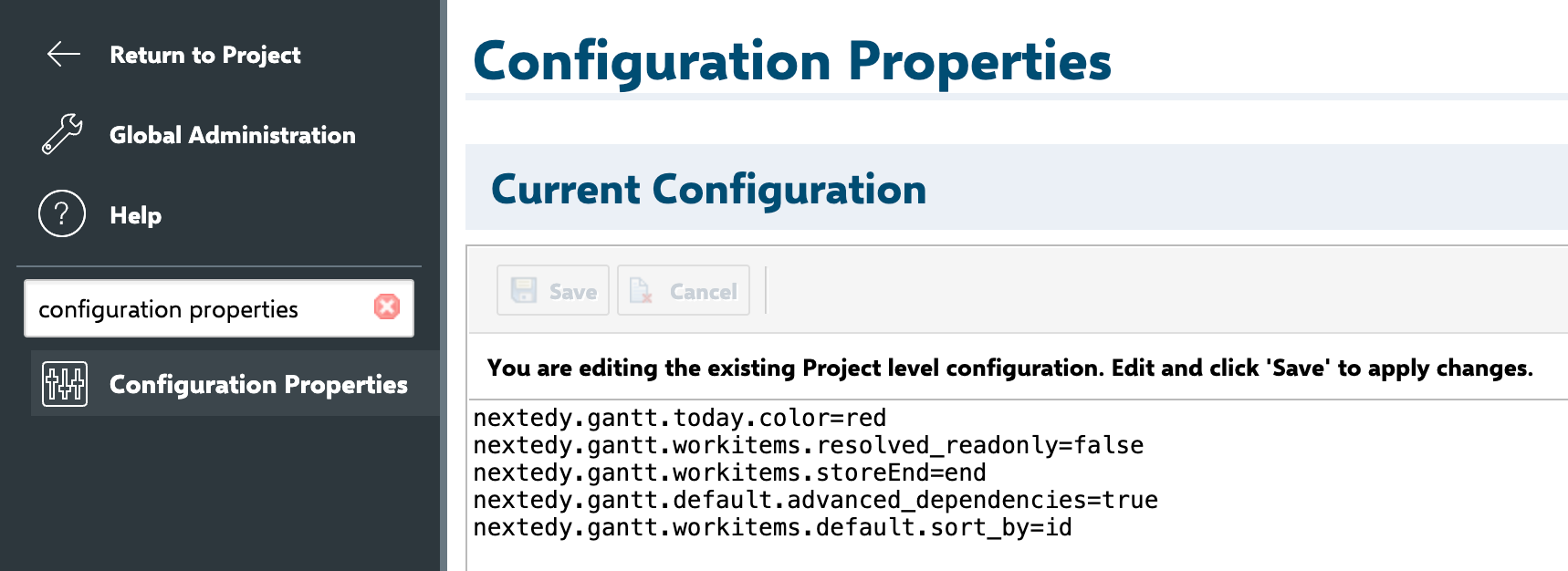
TABLE OF CONTENTS
General Properties
The following properties are used as default values when you load the Gantt.
| Property | Description | Default Value |
| nextedy.gantt.workitems.unplanned_color | Sets the color used for unplanned work items | #C8D0f8 |
| nextedy.gantt.today.color | Sets the color of the today marker | grey |
| nextedy.gantt.classic_project | Enables the classic visual style for project-type items | false |
nextedy.gantt.zoom.DD.min_column_width | Sets the column width for the DD zoom level | 120 |
| nextedy.gantt.zoom.D.min_column_width | Sets the column width for the D zoom level | 60 |
| nextedy.gantt.zoom.D.min_column_width | Sets the column width for the W zoom level | 30 |
| nextedy.gantt.zoom.D.min_column_width | Sets the column width for the M zoom level | 70 |
| nextedy.gantt.zoom.D.min_column_width | Sets the column width for the Q zoom level | 90 |
| nextedy.gantt.zoom.D.min_column_width | Sets the column width for the Y zoom level | 40 |
| nextedy.gantt.zoom.D.min_column_width | Sets the column width for the YY zoom level | 190 |
| nextedy.gantt.debug | Enable client-side debug messages | false |
| nextedy.gantt.default.auto_scheduling | Toggle auto-scheduling | false |
| nextedy.gantt.default.critical_path | Toggle visualization of the critical path | false |
| nextedy.gantt.config.squareTaskBorder | Switches task borders from rounded to square. Setting false in the Gantt Config Script overrides a global true | false |
| nextedy.gantt.config.scheduleUnplannedTasksMode | Determines how unplanned child tasks are scheduled: parent (align to parent start) or today | parent |
| nextedy.gantt.sort_children_by_id | Sorts child WIs by ID instead of the default “Sort by” value | false |
| nextedy.gantt.assignee_column_display_mode | Sets assignee column display: initials or fullname | initials |
| nextedy.gantt.teamManagementProjectId | If set, teams are loaded from this project instead of the current one. | "projectID" |
Gantt Work Items Widget Properties defaults
The following properties are used as default values when you add the Gantt Work Items Widget.
| Property | Description | Default Value |
| nextedy.gantt.workitems.default.sort_by | Default value for "Sort By" property | id |
| nextedy.gantt.workitems.default.expand_level | Default value for "Load children" property, it specifies how many levels should be added to the dataset | 0 |
| nextedy.gantt.workitems.default.show_unplanned | Default value for "Show Unplanned" property | false |
nextedy.gantt.workitems.default.scale | Default value for "Scale" property | W |
nextedy.gantt.workitems.default.parent_link_roles | Default value for "Parent Link Roles" property. It is a list of link role IDs separated by ";" | empty |
nextedy.gantt.workitems.default.dependency_link_roles | Default value for "Dependency Link Roles" property. It is a list of link role IDs separated by ";" | empty |
nextedy.gantt.workitems.default.start_field | Default value for "Start Field" property | gantt_start |
nextedy.gantt.workitems.default.end_field | Default value for "End Field" property | none |
nextedy.gantt.workitems.default.duration_field | Default value for "Duration Field" property | gantt_duration |
nextedy.gantt.workitems.default.progress_field | Default value for "Progress Field" property | gantt_progress |
nextedy.gantt.workitems.default.maximize_view | Default value for "Maximize" property | false |
nextedy.gantt.workitems.default.hide_toolbar | Default value for "Hide Toolbar" property | false |
nextedy.gantt.workitems.default.progress_coloring | Default value for "Progress Coloring" property | true |
nextedy.gantt.workitems.default.drag_children | Default value for "Drag Children" property | true |
nextedy.gantt.workitems.default.max_items | Default value for "Max Items" property | 1000 |
nextedy.gantt.workitems.default.show_today_marker | Default value for "Show Today Marker" property | true |
nextedy.gantt.workitems.default.working_time | Default value for "Show Today Marker" property | true |
nextedy.gantt.workitems.resolved_readonly | Allow moving resolved items on the Gantt chart | true |
Additional defaults
The following properties not yet possible to be configured on a specific instance of Gantt.
| Property | Description | Default Value |
| nextedy.gantt.workitems.default.forward_dependency | By default in Polarion there is a link role DEPENDS_ON, linking task A with task B, so A depends on B (A can be started after B), if you link the tasks other way around (from B to A) | false |
| nextedy.gantt.workitems.default_duration | Default duration of an item, if not specified in task itself(in days) | 10 |
| nextedy.gantt.workitems.default.link_lag | Default lead/lag time for dependency links | 0 |
nextedy.gantt.multiAssignmentSameEffortForAll | Configure if the effort is same or shared for multi assignments | true |
Gantt Plans Widget Properties defaults
The following properties are used as default values when you add the Gantt Plans Widget.
| Property | Description | Default Value |
| nextedy.gantt.plans.default.sort_by | Default value for "Sort By" property | id |
| nextedy.gantt.plans.default.expand_level | Default value for "Load children" property, it specifies how many levels should be added to the dataset | 0 |
| nextedy.gantt.plans.default.show_unplanned | Default value for "Show Unplanned" property | false |
nextedy.gantt.plans.default.scale | Default value for "Scale" property | W |
nextedy.gantt.plans.default.maximize_view | Default value for "Maximize" property | false |
nextedy.gantt.plans.default.hide_toolbar | Default value for "Hide Toolbar" property | false |
nextedy.gantt.plans.default.progress_coloring | Default value for "Progress Coloring" property | true |
nextedy.gantt.plans.default.drag_children | Default value for "Drag Children" property | true |
nextedy.gantt.plans.default.max_items | Default value for "Max Items" property | 1000 |
nextedy.gantt.plans.default.show_today_marker | Default value for "Show Today Marker" property | true |
nextedy.gantt.plans.default.working_time | Default value for "Show Today Marker" property | true |
For any assistance, please don’t hesitate to reach out by submitting a ticket here.
Was this article helpful?
That’s Great!
Thank you for your feedback
Sorry! We couldn't be helpful
Thank you for your feedback
Feedback sent
We appreciate your effort and will try to fix the article